
You can not select more than 25 topics
Topics must start with a letter or number, can include dashes ('-') and can be up to 35 characters long.
1.7 KiB
1.7 KiB
안전 지점 (랠리 포인트)
Safety points are alternative Return Mode destinations/landing points. When enabled, the vehicle will choose the closest return destination of: home location, mission landing pattern or a safety point.
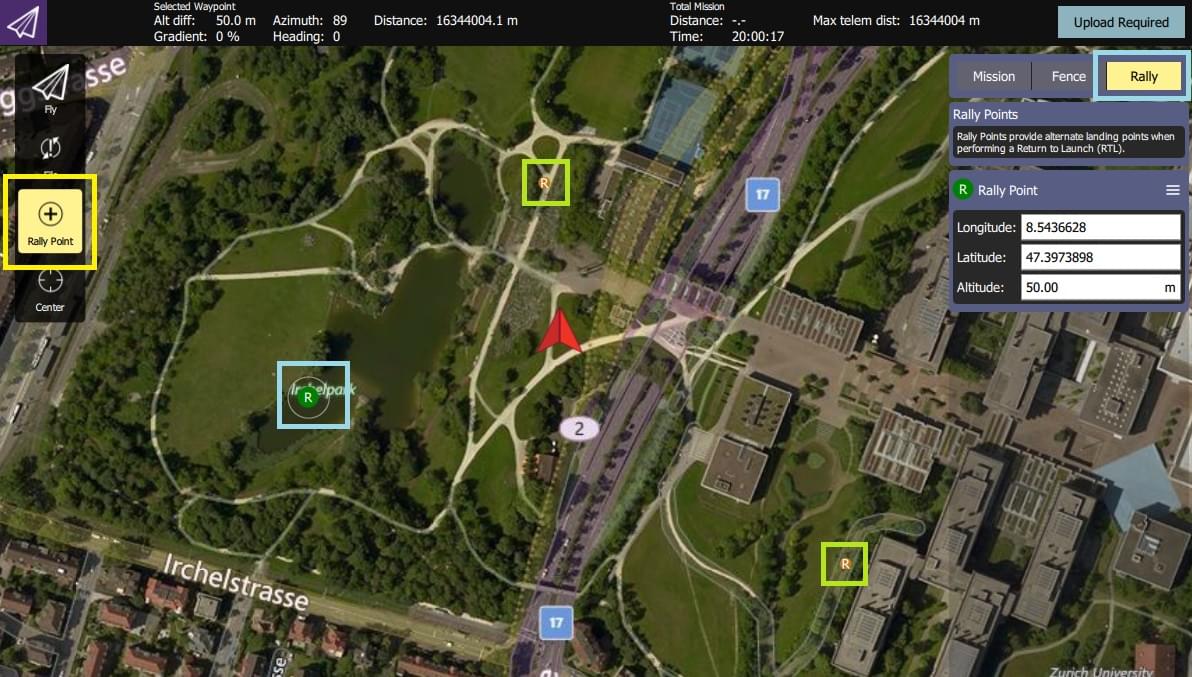
안전 지점 설정
Safety points are created in QGroundControl (which calls them "Rally Points").
전체 개요:
- Open QGroundControl > Plan View
- Select the Rally tab/button on the Plan Editor (right of screen).
- Select the Rally Point button on the toolbar (left of screen).
- 랠리/안전 지점을 추가하려면 지도의 아무 곳이나 클릭하세요.
- The Plan Editor displays and lets you edit the current rally point (shown as a green R on the map).
- You can select another rally point (shown as a more orange/yellow R on the map) to edit it instead.
- Select the Upload Required button to upload the rally points (along with any mission and geofence) to the vehicle.
:::tip More complete documentation can be found in the QGroundControl User Guide: Plan View - Rally Points. :::
안전 지점 사용법
Safety points are not enabled by default (there are a number of different Return Mode Types).
안전 지점을 활성화하려면 :
- Use the QGroundControl Parameter Editor to set parameter: RTL_TYPE=3.